Recently I got interested in electronics and bought myself a STM32VL-Discovery board. It’s really cheap (got for about 10€ from Farnell) and compared to Arduino packs a lot more processing power and features.
Prior to that I had zero experience in electronics and embedded system programming.
After I got pass the obligatory led-blinking projects, I thought I am ready to take on something more complex and bought a 2-line LCD module.
Looking at the tutorials (mostly Arduino related) and specs I came to realize that I need to make delays in microsecond or even nanosecond scale. I had previously used millisecond-accurate delays in my led-blinking projects and it was rather simple – I had to just configure the sys-tick timer to interrupt every millisecond and decrement a counter in interrupt handler.
The trick to make small delays lies in the fact that every instruction that the MCU processes takes some time. It depends on the speed of the MCU how much exactly. For instance – my STM32VL-Discovery runs at 24Mhz. This means that it executes 24000000 instructions per second.
In case you are too lazy to look it up from the Wikipedia here’s what a nanosecond is:
- 1 second (s) is 1000 milliseconds
- 1 millisecond (ms) is 1000 microseconds
- 1 microsecond (µs) is 1000 nanoseconds
- 1 nanosecond (ns) is 1000 picosends
This means that 1 second consists of 109 nanoseconds. So to calculate how many nanoseconds it takes for a 24Mhz MCU to execute one instruction:
109/24000000=41,66666666666666666666…
Meaning it takes roughly 42 nanoseconds to execute a single instruction. Meaning this is the smallest delay this particular MCU is able to make.
Now to actually MAKE that 42-nanosecond delay in a program you need something called NOP-instruction. Depending on the platform/compiler/libraries you are using, this can be written (in C) as:
__nop();
or
__ASM volatile (“nop”);
or
__no_operation();
I personally am using CMSIS library and it takes care of choosing the right syntax when I use a macro:
NOP();
Anyway the rest is easy.
Just keep in mind not to wrap your NOP’s to a function because the function call (and return) consume also MCU cycles and the overhead can be tricky to calculate because of how the compiler optimizes the final result.
On the subject of compiler optimizations there is a small possibility that your compiler might optimize away those NOP’s because from the compilers point of view they do nothing. So you MIGHT need to lower your compiler optimization level to keep your NOP’s in place.

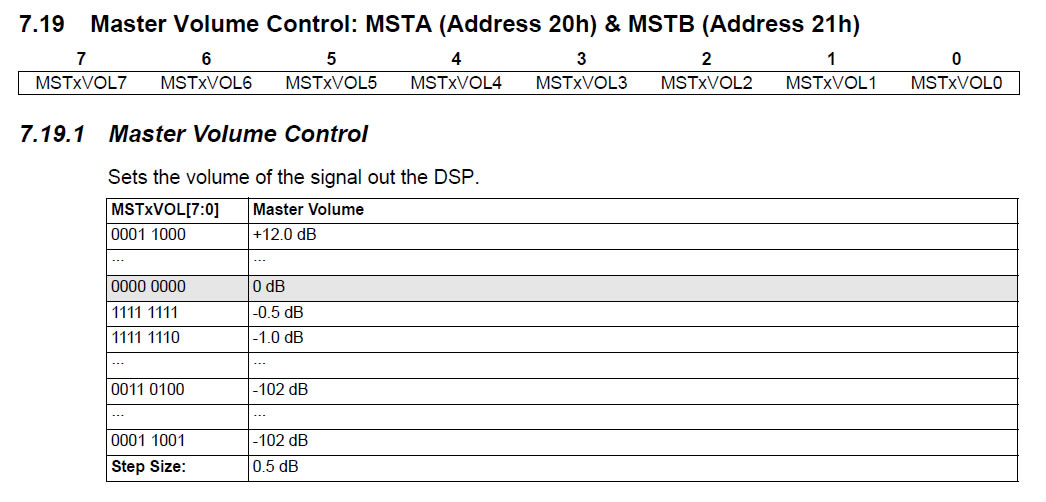 CS43L22 master volume registers 0x20 and 0x21 are documented rather poorly and it’s NOT immediately obvious what’s the logic with the values.