Compiling FFmpeg with NDI support (on Linux)

This assumes that you know how to compile FFmpeg. If you don’t, then I have an article specifically about doing it on Raspberry Pi running Raspbian and also one on just generic Linux box. Go read them.

On Debian-like distros you need package called libavahi-client-dev. On RedHat distros it’s avahi-devel

You will need to download NewTek NDI SDK from here: https://www.newtek.com/ndi/sdk/

You will get basically a big shell script named “NDISDKLINUX“. Run it by making it executable or “sh NDISDKLINUX” should work as well.

The script will unpack itself into a directory named “NDI SDK for Linux“. The simplest way to use the libraries and .h files is to just copy them in a reasonable place – eg. copy the contents of “lib” into a /usr/lib/ and the contents of “include” to /usr/include/

Once you’ve done that, you can use the “–enable-libndi_newtek” for the FFmpeg configure script (along whatever options you need) and do your “make” and “make install” as usual.

Here is an example command how I make Raspberry Pi camera available over NDI in 720p resolution:

ffmpeg -thread_queue_size 512 -f v4l2 -framerate 25 -input_format uyvy422 -video_size 1280x720 -i /dev/video0 -f libndi_newtek 'RPi Cam'

Compiling FFmpeg with hardware acceleration support for Raspberry Pi

This works with Raspbian. The resulting FFmpeg binaries will support the following codecs: MP3, Vorbis, VP6, VP9, x264, Opus and all sorts of related container formats – AVI, MP4, WebM.

The whole process will take about 3 hours.

Because you are about to install a lot of things system-wide, then switch to root user, so you don’t have to prefix everything with “sudo” all the time:

sudo -i

Next you will need to install couple of software packages from the official repository:

apt install git libssl-dev libasound2-dev libomxil-bellagio-dev

Some libraries benefit from having some parts of their code compiled using NASM, so we start with compiling NASM. It is one of the few bits you can install from an official repository if you prefer, but compiling it from the latest source takes only couple of minutes and compared to the v2.12.01, it has fixes for some nasty bugs.

cd /usr/src/
wget http://www.nasm.us/pub/nasm/releasebuilds/2.14.02/nasm-2.14.02.tar.gz
tar -xvf nasm-2.14.tar.gz
cd nasm-2.14
./configure
make
make install

Next comes the MP3 support

cd /usr/src/
wget http://downloads.sourceforge.net/project/lame/lame/3.100/lame-3.100.tar.gz
tar xzvf lame-3.100.tar.gz
cd lame-3.100
./configure --enable-nasm --disable-frontend
make
make install

Then we build the Ogg libraries

cd /usr/src/
wget http://downloads.xiph.org/releases/ogg/libogg-1.3.3.tar.gz
tar xzvf libogg-1.3.3.tar.gz
cd libogg-1.3.3
./configure
make
make install

…and now Vorbis

cd /usr/src/
wget http://downloads.xiph.org/releases/vorbis/libvorbis-1.3.6.tar.gz
tar xvzf libvorbis-1.3.6.tar.gz
cd libvorbis-1.3.6
./configure
make
make install

…and Opus

cd /usr/src/
wget https://archive.mozilla.org/pub/opus/opus-1.3.tar.gz
tar xzvf opus-1.3.tar.gz
cd opus-1.3
./configure --disable-doc --disable-extra-programs
make
make install

…and x264

cd /usr/src/
git clone --depth 1 http://git.videolan.org/git/x264
cd x264
./configure --disable-cli --enable-shared
make
make install

…and VP6 / VP9 are used somewhere

cd /usr/src/
git clone --depth 1 https://chromium.googlesource.com/webm/libvpx.git
cd libvpx
./configure --disable-mmx --disable-examples --disable-tools --disable-docs --disable-unit-tests --enable-vp9-highbitdepth --as=nasm
make
make install

and FINALLY the last act – the actual FFmpeg (this will take around 2 hours)

cd /usr/src/
git clone --depth 1 git://source.ffmpeg.org/ffmpeg
cd ffmpeg
./configure --enable-gpl --enable-nonfree --disable-doc --enable-openssl --enable-libmp3lame --enable-libvorbis --enable-libvpx --enable-libx264 --enable-libopus --extra-ldflags=-ldl --enable-omx --enable-omx-rpi --enable-mmal
make
make install

Now using the FFmpeg with the hardware acceleration…
The following example uses Raspberry Pi’s camera and an external USB audio interface to stream a 720p video to Twitch (the key is not a real one – you have to set up one for yourself):

/usr/local/bin/ffmpeg -hide_banner -loglevel error \
-thread_queue_size 512 -f alsa -ar 44100 -channel_layout stereo -ac 2 -i default:CARD=CODEC \
-thread_queue_size 512 -f v4l2 -framerate 25 -input_format yuv420p -video_size 1280x720 -i /dev/video0 -vf "hflip" \
-vsync vfr -vcodec h264_omx -pix_fmt yuv420p -b:v 2100k -acodec aac -b:a 128k \
-f flv "rtmp://live.twitch.tv/app/live_999999999_abcdefghijklmnopqrstuvwxyzabcd"

Fast algorithm for generating white noise

I was looking for ways to generate white noise in a C program running on STM32F4 (this family of MCU-s has a RNG, but it’s way too slow to use for realtime audio).
Didn’t really find much on the subject. A lot of stuff on PRNG, but all the articles I found seemed to focus on the cryptographic use and the algorithms for that are bit too slow to use on a puny MCU (in my project I wanted to generate 24000 noise samples every second, so I needed an algorithm that would be as fast and simple as possible – the randomness is a nonissue in audio world).

The following snippet is based on code found here:
http://www.bobwheeler.com/statistics/Password/MarsagliaPost.txt

 uint32_t noise_m_z=362436069;
 uint32_t noise_m_w=521288629;

 uint32_t getNoiseSample(void) {
     noise_m_z=36969*(noise_m_z&65535)+(noise_m_z>>16);
     noise_m_w=18000*(noise_m_w&65535)+(noise_m_w>>16);
     return (noise_m_z<<16)+noise_m_w;
 }

I personally treat the resulting uint as Q31 type. This way it is a proper audio sample – a value between -1 and +1 and usable with DSP functions.

CS43L22 Master Volume

Got myself a STM32F4-Discovery board and it comes with a decent audio DAC (CS43L22).

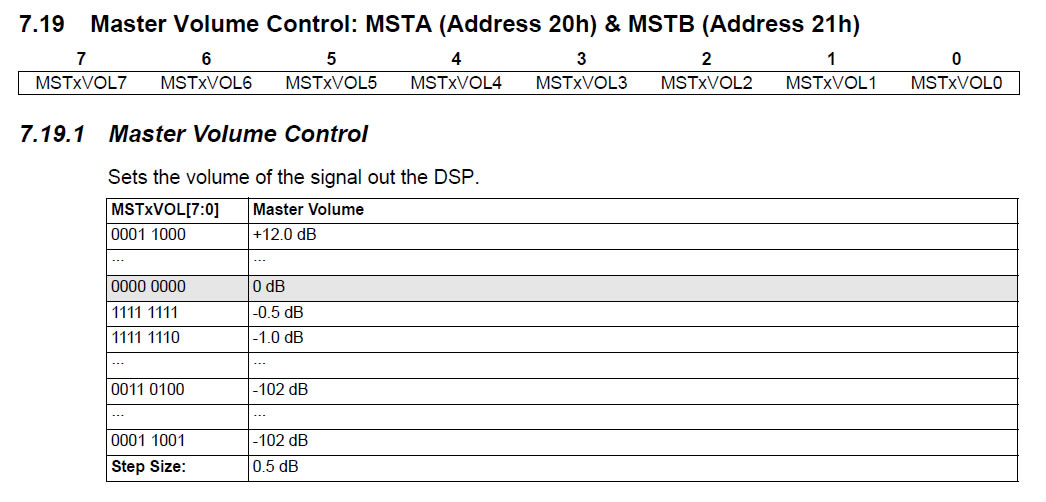
CS43L22-VolumeCS43L22 master volume registers 0x20 and 0x21 are documented rather poorly and it’s NOT immediately obvious what’s the logic with the values.
Anyhow here’s an explanation:
values 1-24 mean positive dB,
values 25-255 mean negative dB
…and the volume doesn’t go any lower than -102dB (values from 25 to 52 all result in volume of -102dB).
Oh and and if this is not confusing enough – the negative dB values are organized backwards. Here’s a table to illustrate this strangeness:

Registry value dB
24 +12.0dB
23 +11.5dB
22 +11.0dB
0 0.0dB
255 -0.5dB
254 -1.0dB
253 -1.5dB
53 -101.5dB
52 -102.0dB
51 -102.0dB
50 -102.0dB
25 -102.0dB

Would have been nice to see this explained in the official documentation and not waste an hour to figure this out.

Calculating note frequencies

The formula for calculating a frequency of a note is something like this:

freq=440*(2^((nIdx-57)/12))

Where the nIdx variable is the index of a note starting from 0.
Here are the frequencies of the zeroth octave:

nIdx Note Freq Freq as int
0 C 16.3516 1071618
1 C# 17.3239 1135339
2 D 18.3540 1202847
3 D# 19.4454 1274373
4 E 20.6017 1350153
5 F 21.8268 1430441
6 F# 23.1247 1515500
7 G 24.4997 1605612
8 G# 25.9565 1701085
9 A 27.5000 1802240
10 A# 29.1352 1909404
11 B 30.8677 2022945

If like me you prefer not to deal with floats and doubles, then you can multiply these numbers by a large constant… 65536 is a popular choiche for instance.

To save memory (my MCU for instance has only 4KB RAM) you can just precalculate the first (zeroth) octave frequencies and derive the frequencies of other octaves with a formula like:

freq=(1<<octave)*freqLookup[midiNoteID%12]

Where octave=midiNoteID/12 and midiNoteID is one from the following table…

 Octave C C# D D# E F F# G G# A A# B
0 0 1 2 3 4 5 6 7 8 9 10 11
1 12 13 14 15 16 17 18 19 20 21 22 23
2 24 25 26 27 28 29 30 31 32 33 34 35
3 36 37 38 39 40 41 42 43 44 45 46 47
4 48 49 50 51 52 53 54 55 56 57 58 59
5 60 61 62 63 64 65 66 67 68 69 70 71
6 72 73 74 75 76 77 78 79 80 81 82 83
7 84 85 86 87 88 89 90 91 92 93 94 95
8 96 97 98 99 100 101 102 103 104 105 106 107
9 108 109 110 111 112 113 114 115 116 117 118 119
10 120 121 122 123 124 125 126 127

Thats really it.

Programming tiny delays on MCU

Recently I got interested in electronics and bought myself a STM32VL-Discovery board. It’s really cheap (got for about 10€ from Farnell) and compared to Arduino packs a lot more processing power and features.

Prior to that I had zero experience in electronics and embedded system programming.

After I got pass the obligatory led-blinking projects, I thought I am ready to take on something more complex and bought a 2-line LCD module.

Looking at the tutorials (mostly Arduino related) and specs I came to realize that I need to make delays in microsecond or even nanosecond scale. I had previously used millisecond-accurate delays in my led-blinking projects and it was rather simple – I had to just configure the sys-tick timer to interrupt every millisecond and decrement a counter in interrupt handler.

The trick to make small delays lies in the fact that every instruction that the MCU processes takes some time. It depends on the speed of the MCU how much exactly. For instance – my STM32VL-Discovery runs at 24Mhz. This means that it executes 24000000 instructions per second.

In case you are too lazy to look it up from the Wikipedia here’s what a nanosecond is:

  • 1 second (s) is 1000 milliseconds
  • 1 millisecond (ms) is 1000 microseconds
  • 1 microsecond (µs) is 1000 nanoseconds
  • 1 nanosecond (ns) is 1000 picosends

This means that 1 second consists of 109 nanoseconds. So to calculate how many nanoseconds it takes for a 24Mhz MCU to execute one instruction:
109/24000000=41,66666666666666666666…

Meaning it takes roughly 42 nanoseconds to execute a single instruction. Meaning this is the smallest delay this particular MCU is able to make.

Now to actually MAKE that 42-nanosecond delay in a program you need something called NOP-instruction. Depending on the platform/compiler/libraries you are using, this can be written (in C) as:

__nop();

or

__ASM volatile (“nop”);

or

__no_operation();

I personally am using CMSIS library and it takes care of choosing the right syntax when I use a macro:

NOP();

Anyway the rest is easy.
Just keep in mind not to wrap your NOP’s to a function because the function call (and return) consume also MCU cycles and the overhead can be tricky to calculate because of how the compiler optimizes the final result.
On the subject of compiler optimizations there is a small possibility that your compiler might optimize away those NOP’s because from the compilers point of view they do nothing.  So you MIGHT need to lower your compiler optimization level to keep your NOP’s in place.

OSMF and SWFElement timeline

During development of couple simple OSMF dynamic plugins recently I bumped into the problem that SWFElement doesn’t provide any control over the timeline of the underlying movieclip. In fact if you look at the OSMF source code you’ll see that the class looks really simplistic and does little else than add a DisplayObjectTrait and LoadTrait.

If for instance you’d need to move the playhead to other frames, play/stop the SWF you are not really given any means to do that.

Even though I really hate the awful mess that is OSMF traits and metadata, I was expecting SeekTrait, PlayTrait and TimeTrait on the SWFElement instances. Why OSMF developers chose not to have them there is a mystery.

Anyway to make a bit better version of the class I extended it and because I’ve really grown to dislike the OSMF-traits, I didn’t bother with adding any new ones. Just added methods play(), stop(), gotoAndPlay() and gotoAndStop().

To achieve that you need to first extend the SWFElement class and add an event listener grabbing TRAIT_ADD events in the constructor:

public class BetterSWFElement extends SWFElement
{
    public function BetterSWFElement(url:URLResource=null, loader:SWFLoader=null)
    {
        super(url, loader);
        addEventListener(MediaElementEvent.TRAIT_ADD, onAddTrait);
    }
...

And in onAddTrait() you need to get the displayObject property from the DisplayObjectTrait, cast it to Loader and cast the attribute called content to Movieclip and this the timeline. It took me full three hours to figure that out. Why this isn’t documented anywhere is beyond me.

private function onAddTrait(event:MediaElementEvent):void
{
    if (event.traitType == MediaTraitType.DISPLAY_OBJECT) {
        var displayObjectTrait:DisplayObjectTrait = getTrait(MediaTraitType.DISPLAY_OBJECT) as DisplayObjectTrait;
        var displayObject:DisplayObject = displayObjectTrait.displayObject;
        timeLine = (displayObject as Loader).content as MovieClip;
    }
}

private var timeLine:MovieClip;

Looks kind of freaky but it does work and I don’t know any other way. If somebody does – please do let me know.

And in case you didn’t figure out yet – the rest is really simple:

public function play():void
{
    if (timeLine != null) {
        timeLine.play();
    }
}

public function stop():void
{
    if (timeLine != null) {
        timeLine.stop();
    }
}

public function gotoAndPlay(frame:Object, scene:String = null):void
{
    if (timeLine != null) {
        timeLine.gotoAndPlay(frame, scene);
    }
}

public function gotoAndStop(frame:Object, scene:String = null):void
{
    if (timeLine != null) {
        timeLine.gotoAndStop(frame, scene);
    }
}

I hope this saves somebody some nerves and helps to keep down the frustrated cursing levels of the world…

Calling FMS admin API methods with PHP

There is a rather simple way of getting status info from a running Flash Media Server. This can be used to draw graphs with Cacti for instance.

First make sure the admin API over HTTP is enabled in /opt/adobe/fms/conf/fms.ini

USERS.HTTPCOMMAND_ALLOW = true

Then enable the methods you need or use a keyword “All” in /opt/adobe/fms/conf/Users.xml

<AdminServer>
    <HTTPCommands>
        ...
        <Allow>All</Allow>
        <Deny></Deny>
        <Order>Deny,Allow</Order>
    </HTTPCommands>
</AdminServer>

Here is a working example of how to get the number of active connections with PHP (you need php-XML module to run this).

<?php
$adminUser='admin';
$adminPassw='SuperSecretPassword';

$xml=new DomDocument();
$url="http://localhost:1111/admin/getServerStats?auser=$adminUser&apswd=$adminPassw";
$xml->load($url);
$connected=getTagContents('connected',$xml);

printf("There are currently %d active connections on the server\n",$connected);

function getTagContents($tagName,$dom) {
    $node=$dom->getElementsByTagName($tagName)->item(0);
    return $node->nodeValue;
}
?>

In the example above I just extract a single value out of a returned XML that looks something like this:

<result>
    <level>status</level>
    <code>NetConnection.Call.Success</code>
    <timestamp>Thu 28 Apr 2011 11:59:24 AM EEST</timestamp>
    <data>
        <launchTime>Tue 26 Apr 2011 07:29:32 PM EEST</launchTime>
        <uptime>145792</uptime>
        <cpus>2</cpus>
        <cpu_Usage>0</cpu_Usage>
        <num_cores>1</num_cores>
        <memory_Usage>4</memory_Usage>
        <physical_Mem>98799616</physical_Mem>
        <io>
            <msg_in>1008000</msg_in>
            <msg_out>190805</msg_out>
            <msg_dropped>0</msg_dropped>
            <bytes_in>423676178</bytes_in>
            <bytes_out>3904886327</bytes_out>
            <reads>434063</reads>
            <writes>168869</writes>
            <bw_in>0</bw_in>
            <bw_out>0</bw_out>
            <total_connects>72</total_connects>
            <total_disconnects>69</total_disconnects>
            <connected>3</connected>
            <rtmp_connects>4</rtmp_connects>
            <rtmfp_connects>0</rtmfp_connects>
            <normal_connects>0</normal_connects>
            <virtual_connects>1</virtual_connects>
            <group_connects>3</group_connects>
            <service_connects>0</service_connects>
            <service_requests>0</service_requests>
            <admin_connects>0</admin_connects>
            <debug_connects>0</debug_connects>
            <total_threads>168</total_threads>
            <working_threads>2</working_threads>
            <swf_verification_attempts>0</swf_verification_attempts>
            <swf_verification_exceptions>0</swf_verification_exceptions>
            <swf_verification_failures>0</swf_verification_failures>
            <swf_verification_unsupported_rejects>0</swf_verification_unsupported_rejects>
            <swf_verification_matches>0</swf_verification_matches>
            <swf_verification_remote_misses>0</swf_verification_remote_misses>
            <server_bytes_in>0</server_bytes_in>
            <server_bytes_out>0</server_bytes_out>
            <rtmfp_lookups>0</rtmfp_lookups>
            <rtmfp_remote_lookups>0</rtmfp_remote_lookups>
            <rtmfp_remote_lookup_requests>0</rtmfp_remote_lookup_requests>
            <rtmfp_redirects>0</rtmfp_redirects>
            <rtmfp_remote_redirects>0</rtmfp_remote_redirects>
            <rtmfp_remote_redirect_requests>0</rtmfp_remote_redirect_requests>
            <rtmfp_forwards>0</rtmfp_forwards>
            <rtmfp_remote_forwards>0</rtmfp_remote_forwards>
            <rtmfp_remote_forward_requests>0</rtmfp_remote_forward_requests>
        </io>
    </data>
</result>

If you decide to pull status info from remote servers then keep in mind that it is not the best idea to make the admin API port world-accessible. Also be aware that the password is passed in plain text on the URL!

A better alternative might be to limit admin API calls to localhost and pass the needed values to your monitoring server over SNMP.

FMS edge/origin configuration

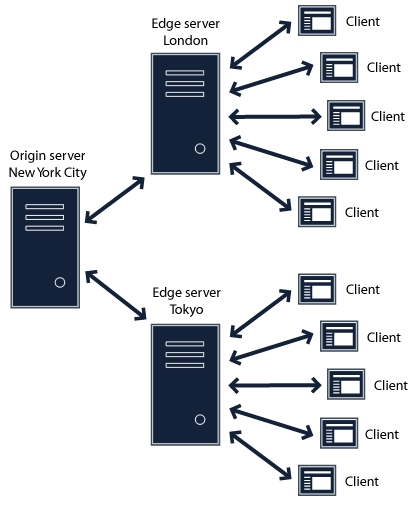
Turns out that setting up a simple load balancing solution with FMS servers is quite easy.

On origin server you don’t need to change anything. On the edge servers locate Vhost.xml file (if you are not using vhosts, then it’s /opt/adobe/fms/conf/_defaultRoot_/_defaultVHost_/Vhost.xml.

Locate the mode-tag that looks something like:

<Mode>local</Mode>

and change it to:

<Mode>remote</Mode>

And you need to let the edge server know what is the address of your origin by putting that info into routeentry-tag:

<RouteEntry>*:*;origin.server.address:*</RouteEntry>

Good idea is to turn on the caching on edge servers too. Look for a tag like

<CacheDir enabled=”true” useAppName=”true”>

Restart FMS on edge servers and create a round-robin DNS record that points to your edge servers and you are done.

Compiling Strobe Media Playback using command line

The developers of Strobe Media Playback are rather vague about how to compile the source code. This article tries to list all the steps needed to get a working SWF on any modern OS.

Here is a list of things you will need to make the magic happen:

  • Java JDK 6
  • Apache Ant
  • Adobe Flex SDK 4
  • FlexUnit 4
  • Ant Contrib

First make sure you have Java (JDK 6) installed on your OS.
Next get Apache Ant from http://ant.apache.org/bindownload.cgi (I used v1.8.2 for this article) or if you are running some OS with central software repositories (Linux, FreeBSD, etc), then install using the tools provided with it (yum, pkg_add, apt-get, etc).
When setting up Apache Ant on a Windows machine make sure you add the bin directory to PATH variable of the system.

Then go and download the Strobe Media Playback source from http://sourceforge.net/projects/smp.adobe/files/ (for this article I used v1.5.1). Uncompress the downloaded file and at the root of the uncompressed source directory create the following subdirectories:

./buildtools/
./buildtools/libs/
./buildtools/sdks/
./buildtools/sdks/4.1.0/

Now lets populate the ./buildtools folder with some… umm build tools obviously… duh…

Go and download Flex 4 SDK from http://opensource.adobe.com/wiki/display/flexsdk/Download+Flex+4 (for this article I used v4.1.0.16076). Uncompress the files into the ./buildtools/sdks/4.1.0/ subdirectory.

Now we’ll need something called ANT Contrib. Version 1.0b3 to be precise. Uncompress the archive and move the ant-contrib-1.0b3.jar file to ./buildtools/libs/

Finally something called FlexUnit… from the download page choose the stable release FlexUnit (4.0 SDK). Uncompress the the archive and move flexUnitTasks-4.0.0.jar to ./buildtools/libs/

If using Windows, then now you can execute the “src\build.bat compile.strobe”.

For unix-like OS-es you need to create a shell script ./src/compile.strobe, like:

#!/bin/bash
BUILD_TOOLS=”..\buildtools”
/usr/bin/ant \
-lib ${BUILD_TOOLS}\sdks\4.1.0\lib \
-lib ${BUILD_TOOLS}\sdks\4.1.0\ant\lib \
-lib ${BUILD_TOOLS}\libs \
compile.strobe

If you don’t have bash, then just tweak the script a bit to match the conventions of your favourite shell.

If you look inside ./src/build.xml, you’ll notice that there are many other build targets besides “compile.strobe”. Haven’t yet worked out how to make them all work… will post an update when I do.

Debug build for Flash Player 10.1